In the digital era, transparency in financial management is crucial, especially for government employees who rely on the General Provident Fund (GPF) for their future security. If you are looking for a reliable way to perform a GPF balance check online, you have come to the right place.
This comprehensive guide will walk you through the step-by-step process of checking your GPF status, understanding your statement, and troubleshooting common issues in 2026.
What is GPF (General Provident Fund)? (H2)
The General Provident Fund is a long-term savings instrument for government employees in many countries, including Bangladesh and India. A specific percentage of the employee’s basic salary is deducted monthly and deposited into this fund. The government provides a competitive interest rate on the accumulated balance, making it a powerful tool for post-retirement financial stability.
Why Should You Check Your GPF Balance Regularly? (H2)
Monitoring your GPF account is not just about seeing the numbers grow; it is about ensuring accuracy. Here is why regular checking is vital:
- Verification of Monthly Deductions: Ensure that your DDO (Drawing and Disbursing Officer) has correctly posted your monthly subscriptions.
- Interest Calculation: Verify if the annual interest (profit) has been credited correctly according to the government’s declared rate.
- Loan Planning: If you intend to take a GPF advance for home construction or family emergencies, knowing your current balance is the first step.
- Error Detection: Identifying missing postings or technical glitches early makes the rectification process much easier.
How to Check GPF Balance Online 2026 (Step-by-Step) (H2)
The official portal for GPF information (typically cafopfm.gov.bd or the iBAS++ system) has been updated for better user experience. Follow these steps:
Step 1: Access the Official Portal
Open your browser and navigate to the official Finance Division portal. Ensure you are using a secure connection (look for the “https” in the URL).
Step 2: Enter Your NID and Mobile Number
You will need to provide:
- National ID (NID) Number: Use the 10-digit smart card number or the 17-digit old NID number (including birth year).
- Registered Mobile Number: This must be the same number used during your Pay Fixation.
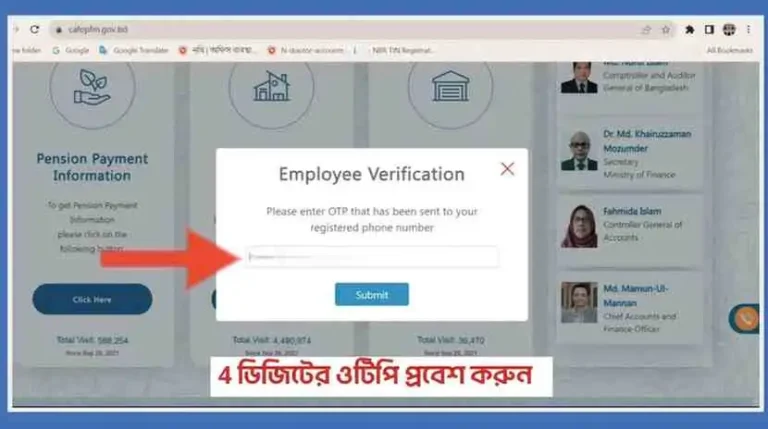
Step 3: OTP Verification
Once you submit your details, a 4 to 6-digit One Time Password (OTP) will be sent to your mobile. Enter the OTP within the given timeframe (usually 3-5 minutes).
Step 4: View Statement and Ledger
After successful verification, you can choose the fiscal year (e.g., 2025-2026) to view your closing balance, total subscription, and total profit.
Understanding Your GPF Account Slip (H2)
A standard GPF slip contains several technical terms that might be confusing:
- Opening Balance: The amount carried over from the previous financial year.
- Subscription: The total amount deducted from your salary during the year.
- Refund: The amount you repaid if you had taken a GPF loan.
- Withdrawal: Any advance or loan you took from the fund during the year.
- Closing Balance: The final amount in your account after adding profit and subscriptions.
Common Problems and Troubleshooting (H2)
Even with a robust system, users often face hurdles. Here are the most frequent issues and their solutions:
1. “Invalid Information” Error
This happens if your NID or Date of Birth does not match the iBAS++ database.
- Solution: Check your Pay Fixation copy. If there is a typo in the database, contact your local Accounts Office for correction.
2. OTP Not Received
Mobile network congestion or an outdated number in the system can prevent you from receiving the OTP.
- Solution: Try again during off-peak hours or verify if your mobile number is correctly mapped in the government payroll system.
3. Missing Posting of Subscriptions
If you see a “zero” or missing entry for a specific month, it means the data wasn’t uploaded.
- Solution: Keep your monthly pay slips as evidence and submit a formal application to the Accounts Office to update the ledger manually.
GPF Interest Rates and Calculation (H2)
The government usually declares the GPF interest rate annually. For 2025-2026, the rates generally hover around 11% to 13% depending on the slab system.
- Calculation Formula: $Closing\ Balance = Opening\ Balance + Subscriptions + Profit – Withdrawals$
Frequently Asked Questions (FAQ) (H2)
Q1: Can I check my GPF balance without an OTP?
A1: No, for security reasons, the OTP is mandatory to verify the identity of the employee.
Q2: Is the online GPF slip legally valid?
A2: Yes, the system-generated GPF statement is generally accepted for official purposes, though some departments may require a signature from the Accounts Officer for loan approvals.
Q3: How often is the GPF balance updated?
A3: Real-time updates occur after monthly payroll processing. However, the final annual interest is usually added at the end of the fiscal year (June/July).
Conclusion (H2)
The GPF balance check process has transitioned from tedious paperwork to a few clicks on your smartphone. By following the steps above, you can ensure your hard-earned savings are secure and growing. Stay informed, stay secure.